Import two E57 scans without losing track of what changed.
An E57 file can contain several scans with separate attributes and poses. This worked example follows the website’s two-panel sample through selection and import, then explains which parts of the original file a PLY result cannot preserve.
1. Inspect the scan list before importing
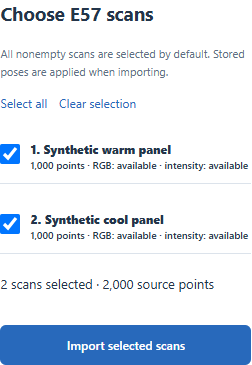
Open E57 to PLY and click Try a sample cloud. The file is 46,080 bytes and contains two named scans: Synthetic warm panel and Synthetic cool panel. Each has 1,000 points, RGB and intensity. Both are selected by default. At this stage the file is a scan catalog: choose the scans and click Import selected scans before attempting to crop, subsample or export the combined working cloud. You can also download the unchanged E57 from the original upload.
2. Check the imported cloud and its properties
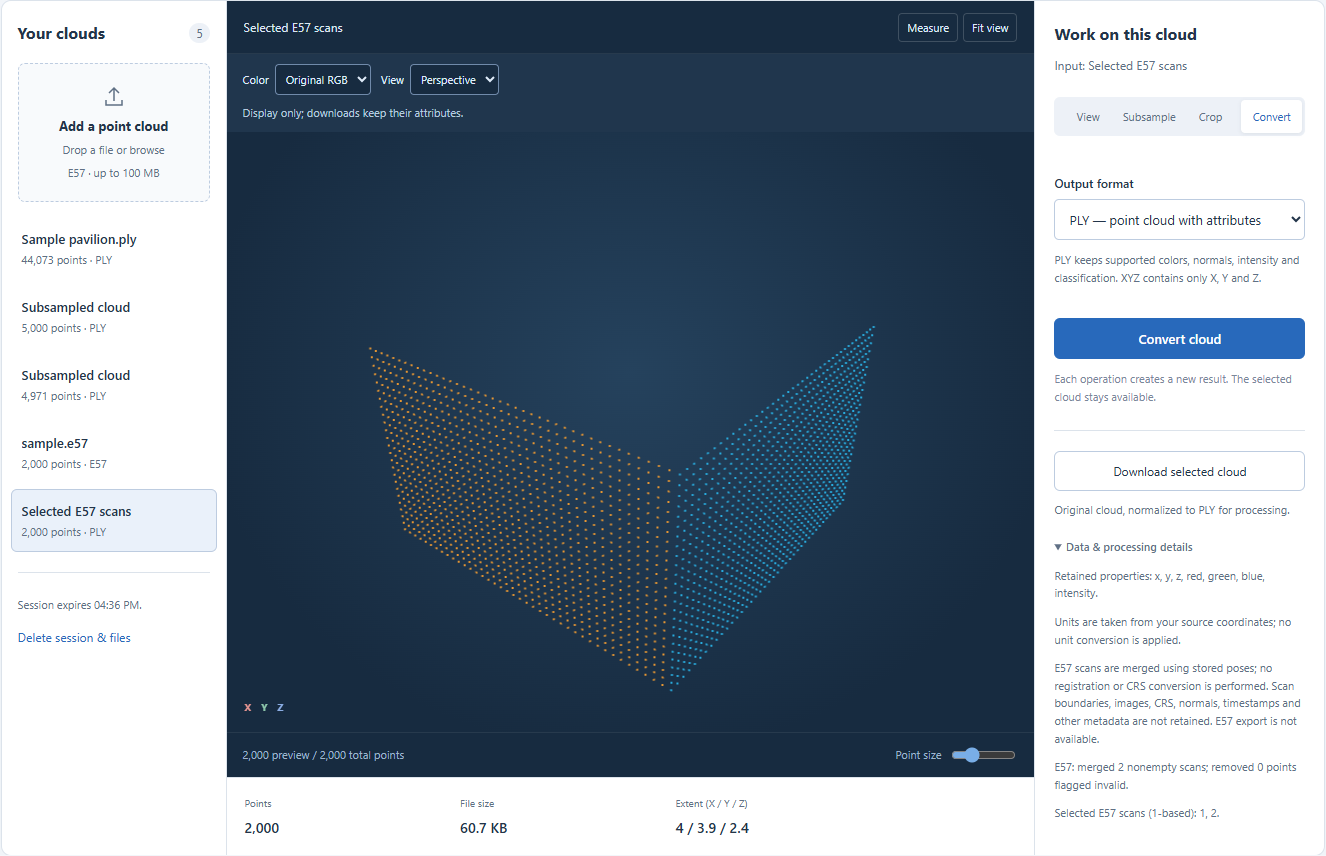
With both scans selected, our import produced one PLY working cloud with 2,000 points, 62,206 bytes, and x, y, z, red, green, blue and intensity properties. Open Data & processing details to see the actual property list and warnings. No points were marked invalid in this sample. The cool panel has a stored rotation and translation; the importer applies them when placing its points. The two panels visible in the screenshot demonstrate those stored positions, rather than an alignment calculated by this website.
3. Understand the common-attribute rule
Color is retained only when every selected nonempty scan supplies supported RGB without color-invalid flags. Intensity has an equivalent rule. For example, if scan A has RGB and scan B has no RGB, selecting A alone can retain color, while selecting A and B together omits RGB from the merged cloud and reports a warning. That mixed-attribute situation is not the supplied two-panel sample: both sample scans have both attributes. Supported E57 colors here are integer values from 0 to 255. Check the scan list and warnings rather than assuming that a color-capable file always yields a colored PLY.
4. Stored poses are not registration
If the source scans are unaligned or their saved poses are wrong, merging them here will not solve that problem. The importer does not run ICP, estimate a new transformation, remove overlapping duplicate points, convert units or reproject a coordinate reference system. Use a suitable registration workflow first when needed. Point coordinates flagged invalid are filtered during import; a lower output count can therefore reflect invalid-point removal as well as the scans you chose. The warning states how many invalid points were removed.
5. Export a derivative and keep the E57
Choose PLY to retain the supported attributes shown in the working cloud. Choose XYZ only when three coordinate columns are sufficient; it drops RGB and intensity. Neither output preserves the original scan boundaries, images, CRS, timestamps or the full E57 metadata structure. Normals and unsupported fields are also omitted by this importer. Download the original E57 separately if you need those records later. The temporary session expires after two hours, and this website does not export E57.
| Stage or choice | Points | What it contains |
|---|---|---|
| Original sample E57 | 2 × 1,000 | Two scans; stored poses; RGB and intensity |
| Observed imported PLY | 2,000 | 62,206 bytes; XYZ, RGB and intensity |
| XYZ export behavior | Coordinates of the selected cloud | X, Y, Z only; no RGB, intensity or scan structure |
Common questions
Does selecting one scan modify the original E57?
No. Import creates a separate working cloud. The original upload remains available during the session, so you can return to its scan list and choose another subset.
Why does a selected cloud look colored without RGB?
The viewer can use height coloring when RGB is absent. That display does not add RGB attributes to the downloaded file. Read the retained-property list to distinguish stored colors from a visualization.